

Why I Built Smart Sync CMS: A Better Way to Bulk Update Webflow CMS
I kept running into the same problem while working on Webflow projects.
The website was built. The CMS was structured. Everything worked.
Then came the content.
A collection could have 500 or 1,000 existing items, and suddenly the client needed one new field added across all of them. Or I received an Excel file with hundreds of updates. Or images needed to be added to existing CMS items.
None of these tasks were particularly difficult.
They were just painfully slow.
The problem with large Webflow CMS updates
Webflow works well when you're editing individual CMS items.
The problem starts when you need to make the same type of change across hundreds of them.
This becomes especially important when the Webflow CMS is structured for a scalable website.
I kept finding myself choosing between workflows that all created extra work:
- edit CMS items manually;
- export data, modify it and import it again;
- prepare spreadsheets in exactly the right structure;
- build an automation through another platform;
- connect several tools just to complete one CMS operation.
And updating existing content introduces another problem.
You don't necessarily want to replace an entire collection.
Sometimes you just want to say:
Find these existing items by slug and update this one field. Leave everything else alone.
That should be a simple operation.
So I decided to build it.
Smart Sync CMS
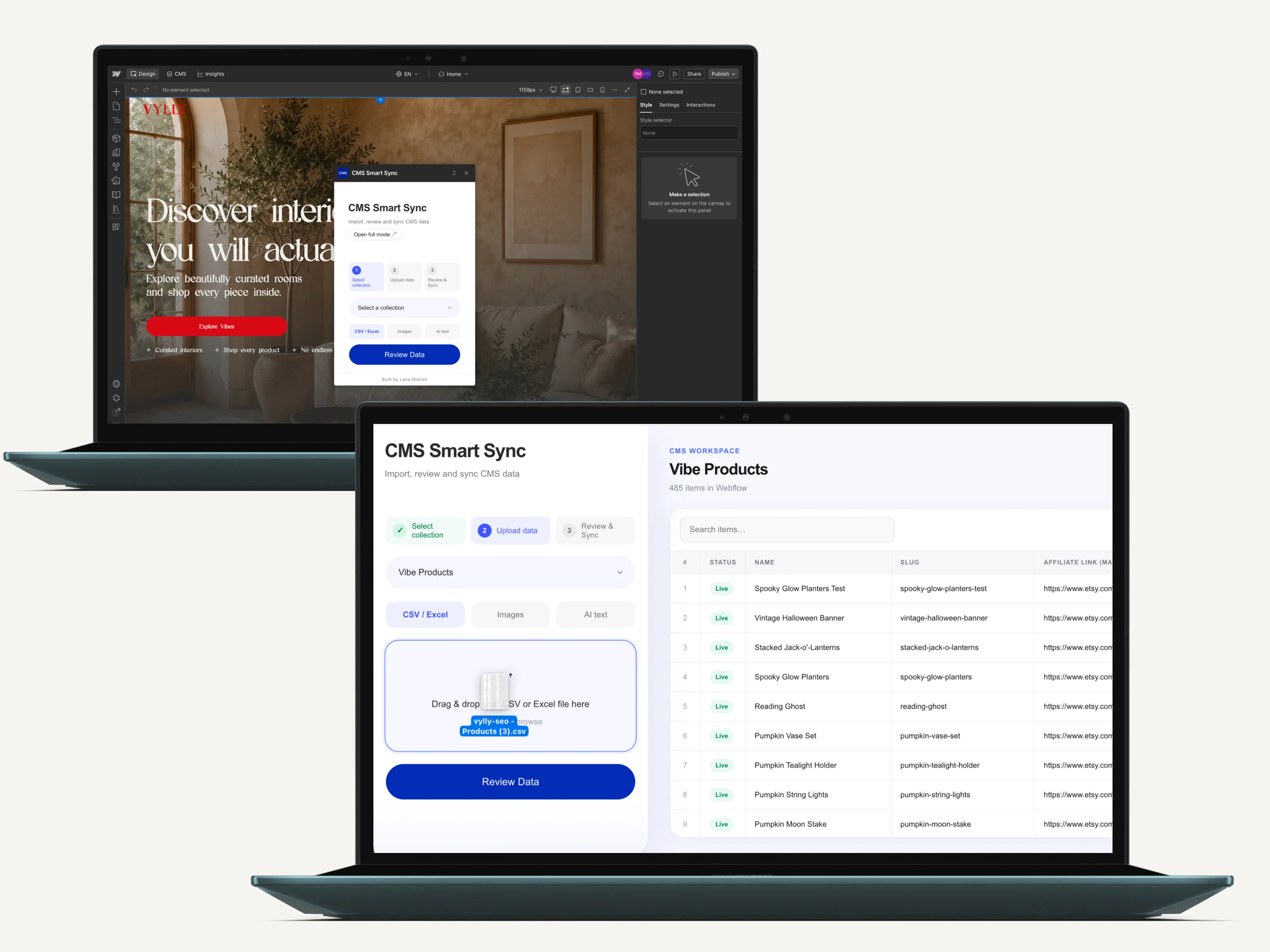
Smart Sync CMS is a Webflow CMS management app I designed and developed to handle large CMS operations from one workflow.
Instead of treating every CMS task as a separate process, the app follows the same basic sequence:
Select collection → Add data → Map fields → Review changes → Sync
Before anything is written to Webflow, the app reads the existing collection and determines what is actually going to happen.
That distinction became one of the most important parts of the product.
Updating existing CMS items
For CSV and Excel imports, incoming data can be mapped directly to existing Webflow CMS fields.
Existing items can be matched by slug.
This means a collection can already contain hundreds of products and I can update only the fields that need to change.
New rows can be identified separately and created as new CMS items.
The same workflow can also populate a new collection from scratch.
AI-assisted CMS updates
Not every content update starts with a clean spreadsheet.
Sometimes the input is unstructured text that needs to become structured CMS content.
So I added an AI-assisted workflow using the OpenAI API.
The AI can interpret or transform the supplied text and prepare it for a selected CMS field.
But AI doesn't write blindly into the collection.
The generated data still goes through the same review process before synchronization.

Bulk image handling
Images created another repetitive CMS task.
Smart Sync CMS includes a separate workflow for preparing and matching images to CMS image fields in bulk.
That keeps text, metadata and visual assets inside the same CMS management workflow instead of turning image uploads into another manual process.

Review before sync
This was something I didn't want to compromise on.
Before a large operation reaches the live CMS, Smart Sync separates the result into:
Updates · Creates · Errors · Warnings
You can inspect what the system recognized before approving the operation.
s
For me, the workflow needed to change from:
“Import it and see what happens.”
to:
“See exactly what will happen, then sync it.”

Built inside the Webflow ecosystem
Smart Sync CMS isn't a spreadsheet tool with Webflow attached to it afterward.
I built it around Webflow itself.
That’s also why I tend to treat Webflow as a business decision, not just a website builder.
The product combines:
Webflow Designer Extension
Webflow API
CMS read/write operations
Slug-based item matching
Field mapping and validation
OpenAI API
The full application codebase is maintained in a private GitHub repository.
The Designer Extension allows the workflow to start directly inside Webflow, while a larger interface handles operations that need more space.

Testing it on a real Webflow CMS
Building the workflow was one thing.
I also wanted to know what happened when it handled a real large CMS operation.
So I tested it against an existing Webflow collection.
483 CMS items were updated in a single sync.

The test covered more than whether the API could process hundreds of records.
It tested the complete workflow:
matching existing items, preparing changes, reviewing the operation and synchronizing the final data.
Why I built it
Smart Sync CMS started because I was tired of solving the same CMS problem repeatedly.
I didn't want another workaround for one project.
I wanted the workflow itself to disappear.
One place to import data, understand the existing collection, prepare changes, catch problems and sync the result.
That's what Smart Sync CMS became.
Smart Sync CMS was submitted to the Webflow Marketplace in August 2026.
If you're working with a large Webflow CMS or planning a Webflow build, you can see more of my work here.
Working with a large Webflow CMS?
Smart Sync is being built to make bulk CMS work easier — from importing and generating content to mapping, reviewing and syncing it with Webflow.
More Question